


If you are searching for how to fix phone speaker issues, you are dealing with one of the most common phone problems people run into, whether the sound has gone muffled, quiet, distorted, or stopped completely. The good news is that how to fix phone speaker problems almost always come down to a small handful of causes.
Most of them can be solved at home in a few minutes without any tools or technical background. This guide walks through every method that works, covering software glitches, dust buildup, water exposure, and the point where it actually becomes a hardware problem, so you never have to search anywhere else to solve it.
Why Your Phone Speaker Stops Working
Before trying any fix, it helps to understand what usually causes the problem in the first place. The most common reasons a speaker stops sounding right include dust or lint blocking the speaker grille, moisture trapped inside after rain, sweat, or an accidental spill, a software glitch affecting the audio system.
A Bluetooth connection quietly routing sound elsewhere, or in rarer cases, physical damage to the speaker itself. Understanding which category your issue falls into makes the rest of this guide on how to fix phone speaker problems much faster to work through, since you can skip straight to the section that actually applies to you.
How to Fix Phone Speaker Problems With Quick Checks First
Before doing anything more involved, run through these basic checks. Make sure your phone is not muted, the volume is turned all the way up, and Do Not Disturb mode is switched off. Confirm that your phone is not still connected to a Bluetooth speaker, headphones, or a car system, since sound gets redirected there automatically even if that device is out of range.
A simple restart also clears a surprising number of temporary audio glitches without you needing to change a single setting. Finally, remove your phone case, since a thick or poorly designed case can quietly muffle the speaker opening. These checks alone solve a large share of how to fix phone speaker searches before any deeper troubleshooting is even needed.
How to Clean a Blocked Speaker
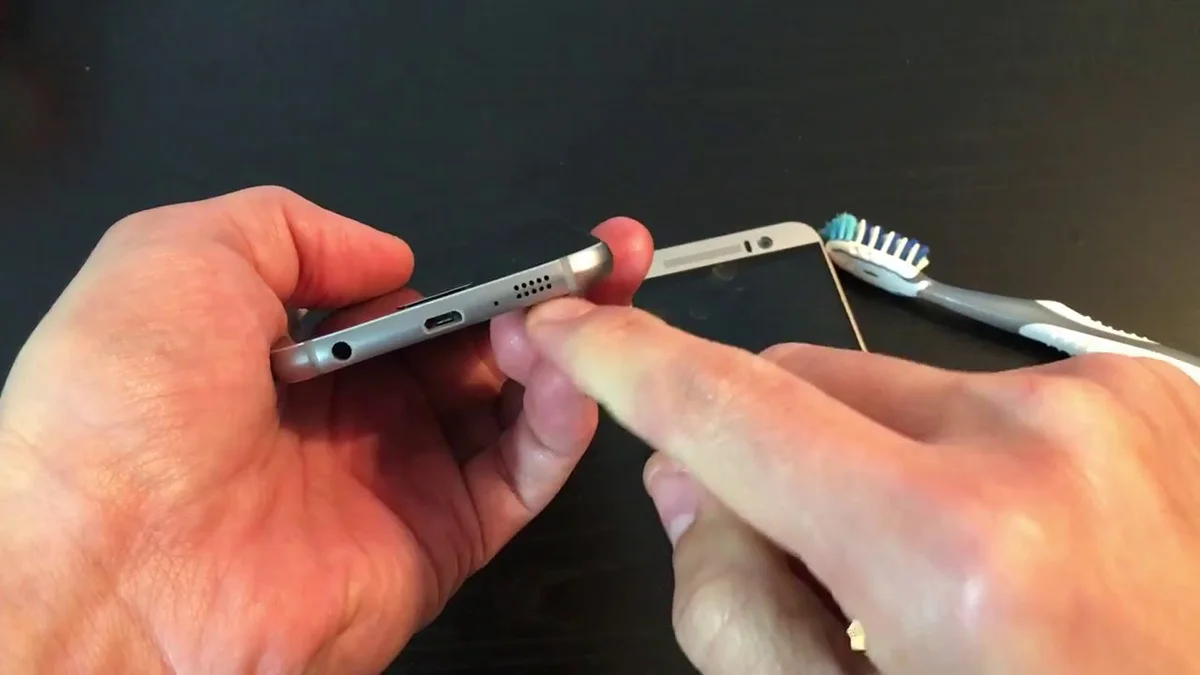
Dust and lint buildup inside the speaker grille is one of the most common reasons for muffled or quiet sound, especially if your phone spends a lot of time in a pocket or bag. A clean, dry, soft bristled brush works well as a speaker cleaner, gently loosening debris with short strokes rather than pressing hard. A can of compressed air held a few inches away can also blow out trapped dust, using short bursts instead of one long spray.
As a last resort, a small folded piece of tape, sticky side facing outward, can gently lift out stubborn debris that brushing alone could not remove. Cleaning is usually the very first physical step in how to fix phone speaker situations where the sound is present but sounds quiet or muffled rather than completely silent.
How to Fix Phone Speaker Problems Caused by Water
Water damage is one of the most searched reasons people look up how to get water out of phone speakers, and it is worth treating as its own category since the fix is different from dust or software issues. If your speaker sound became muffled, crackly, or silent right after your phone got wet, moisture trapped inside is very likely blocking the sound until it fully evaporates.
The simplest water removal method is patience. Leave your phone speaker facing down in a dry, room temperature spot for several hours, which allows trapped water to drain and evaporate naturally. Many Android phones also include a built in water eject sound feature in their settings app that uses a low frequency tone to physically push moisture out of the speaker grille, and searching your phone settings for water eject will usually surface it directly.
iPhones handle water detection automatically in the background, but giving the device time and airflow still helps the process along. Avoid common mistakes when trying to get water out of a phone. Never use a hairdryer or other direct heat source, and never place your phone in a bag of rice, since both of these can push moisture deeper into internal components rather than pulling it out.
If sound is still muffled a full day after exposure, running the water eject sound feature again or repeating the face down waiting period usually finishes the job. Water related cases make up a large portion of all how to fix phone speaker questions, so it is worth ruling this cause out early if your phone has been anywhere near moisture recently.
Software Fixes That Solve Speaker Problems
If cleaning and water removal do not apply to your situation, the next place to look is software. An outdated operating system can occasionally cause unexplained audio glitches, so checking for a pending update and installing it is worth doing early. Resetting your sound and vibration settings back to default can also resolve conflicts left behind by a previous app or an accidental setting change.
It also helps to test the same sound in a different app, since a speaker that fails only during one specific app, like a video call service, often points to that app rather than the phone speaker itself. Software fixes are often the fastest path forward, since they require no physical cleaning at all.
Fix My Speaker on Samsung and Other Android Phones
Samsung loudspeaker issues are searched often enough that they deserve a direct mention. If your Samsung phone speaker sounds distorted or quiet, the same core fixes apply, starting with a soft brush cleaning of the grille, followed by checking for a stuck Bluetooth connection, then trying the built in water eject sound feature if moisture is a possibility.
Samsung devices in particular sometimes benefit from a full software update, since certain audio bugs have been resolved specifically through system updates on newer models. Readers searching fix my speaker on a Samsung device can follow the exact same order of steps above, simply adjusted for where Samsung places its settings menus.
iPhone Versus Android Speaker Fixes
| Issue | iPhone Fix | Android Fix |
|---|---|---|
| Muffled or quiet sound | Clean the speaker grille gently | Clean the speaker grille gently |
| Water exposure | Face down and wait, avoid heat | Use the built in water eject sound feature |
| Bluetooth stuck | Forget the device in Bluetooth settings | Forget the device in Bluetooth settings |
| Software glitch | Restart or update iOS | Restart or update Android |
| Volume too low | Check side volume buttons and mute switch | Check volume buttons and sound profile |
When the Problem Is Hardware Damage
If you have worked through every fix above and the phone speaker still sounds distorted, crackly, or completely silent, the speaker component itself may be physically damaged. This becomes more likely if your phone was recently dropped or exposed to significant water beyond what a quick water removal fixes.
At this stage, comparing a professional repair cost against the value of your phone is the most practical next step, since older devices sometimes cost nearly as much to repair as they would to replace. Hardware damage is genuinely the least common cause behind how to fix phone speaker searches, so it should always be the last conclusion, not the first.
Common Mistakes to Avoid
A few habits make speaker problems worse rather than better. Poking anything sharp into the speaker grille to clear debris risks damaging the delicate mesh underneath, since that mesh protects the internal speaker cone from dust and moisture. Using excessive heat to dry out water exposure can warp internal components or damage the adhesive seals many modern phones rely on for water resistance.
Ignoring a persistent Bluetooth connection and assuming the speaker itself is broken is one of the most common misdiagnoses. Shaking the phone vigorously to force water out is another habit worth avoiding, since it can push moisture further into ports and seams rather than out of them.
How Long Speaker Problems Usually Take to Fix
Most readers are surprised at how quickly these issues resolve once the correct cause is identified. A blocked Bluetooth connection takes seconds to fix once found. Cleaning a dusty speaker grille typically takes two to five minutes. Water related issues take the longest, often several hours of passive waiting rather than active effort. Software updates rarely take more than fifteen to twenty minutes from start to finish.
How to Prevent Future Phone Speaker Problems
Avoid setting your phone face down on dusty or sandy surfaces, clean the speaker grille occasionally with a soft brush before dust builds up, choose a case with a fully open speaker cutout instead of a thick covered edge, and keep your phone away from prolonged water exposure whenever possible. Speaker cooling also matters more than people realize, since a phone that overheats during long calls or gaming sessions can sometimes produce temporarily distorted sound until it cools back down naturally.
Final Thoughts on How to Fix Phone Speaker Issues
Most of the time, how to fix phone speaker problems comes down to simple, fixable causes rather than permanent damage. Working through the checks in order, starting with the basics, moving into cleaning, then water removal if relevant, and finally software fixes, resolves the issue for the overwhelming majority of readers. Bookmarking this guide means the next time sound trouble shows up on any device in your household, you already have every step in one place.
Frequently Asked Questions
Why can’t I hear anything on my phone?
This usually means the speaker grille is blocked by dust, your phone is connected to a Bluetooth device you forgot about, or Do Not Disturb is quietly muting sound.
Why is my sound not working on my phone?
Sound failing across the entire phone, rather than just one app, generally points to a software glitch or a system wide setting issue.
Why is the sound on my phone not working?
If sound worked recently and suddenly stopped, a temporary glitch is the most likely cause. A simple restart clears this far more often than people expect.
Why is there no sound on my phone?
Beyond basic volume and mute checks, water exposure and speaker grille blockage are the two most common physical causes.
Why is my speaker not working?
A speaker that produces no sound at all is more likely tied to a stuck Bluetooth connection or a deeper software issue than simple dust.